 Bill My Car
RTO and Ownership Transfer
How to Fill Form 29 and Form 30: Step by Step, With Filled Samples
For Car and Bike Dealers in India
Start free →Form 29 and Form 30 fail at RTO counters for small reasons: a signature in the wrong box, a chassis digit that does not match the RC, a blank that should say "not applicable". This is the field-by-field walkthrough, with filled samples, so both forms go through the first time.
New to what these forms are? Start with the basics: Form 29 explained, Form 30 explained, and the difference between them.
Before you start: keep these in front of you
- The RC (registration certificate), for the exact registration, chassis and engine numbers
- The buyer's full name, father's name, and complete address with PIN, as per their ID proof
- The sale date agreed on the sale letter
- Blue or black pen; the signature must match the RC and ID records
Copy vehicle numbers character by character from the RC, not from memory and not from the number plate. A single mismatched digit is the most common rejection.
Filling Form 29 (the seller's notice)
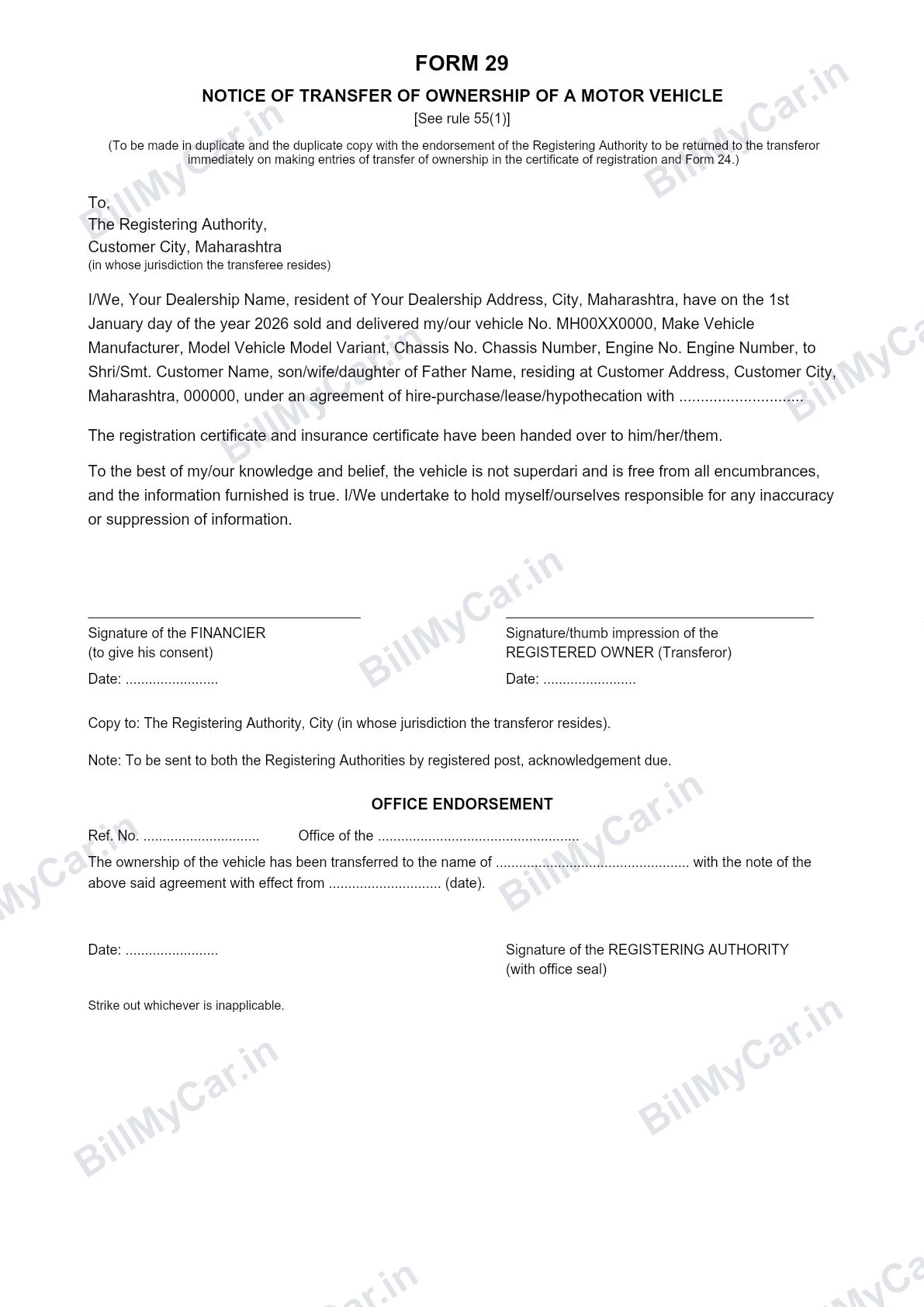
A filled sample of Form 29. Sign in to BillMyCar.in and generate yours, auto-filled, in seconds.
Form 29 is one page. Field by field:
- To: The Registering Authority: write the RTO of the place where the buyer resides.
- Name and address of the seller: as on the RC.
- Vehicle details: registration number, make, model, chassis number, engine number, all exactly as on the RC.
- Date of sale: the date on your sale letter and invoice. All three documents must agree.
- Buyer's name and address: full name with son/wife/daughter of, and the complete address with PIN.
- Hire-purchase/lease/hypothecation line: if there is no loan, strike it out or write "N.A.". If there is, name the financier.
Where to sign Form 29
- Right side: seller's signature or thumb impression, as "registered owner (transferor)".
- Left side: the financier signs only when the vehicle is under hire-purchase, lease or hypothecation. Otherwise leave it blank or strike it out.
- Date both signature blocks.
Form 29 is prepared in duplicate. Send one to the buyer's RTO and a copy to your own RTO if different, by registered post with acknowledgement due, or hand it in and keep a stamped receipt.
Filling Form 30 (the application)
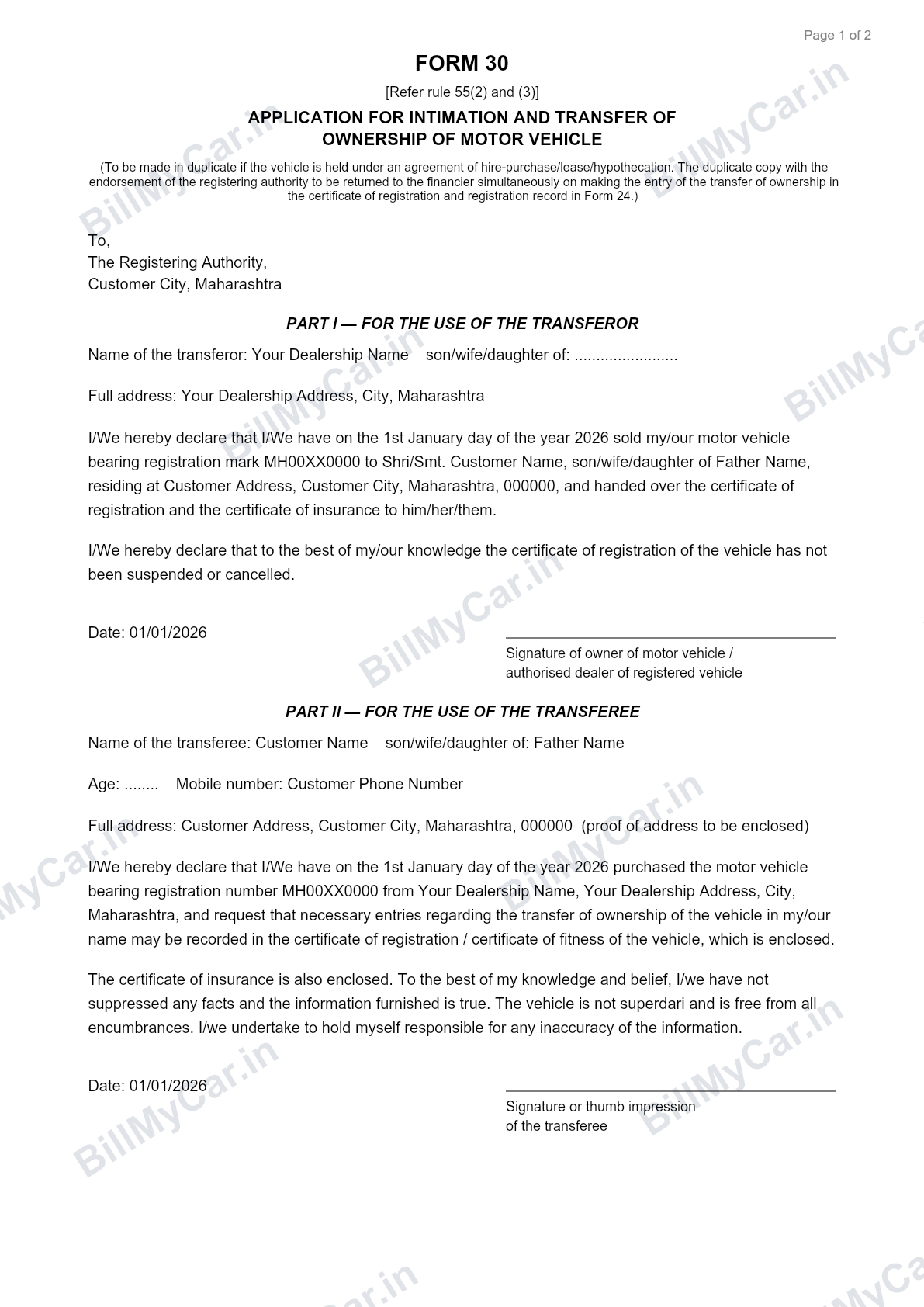
A filled sample of Form 30. Sign in to BillMyCar.in and generate yours, auto-filled, in seconds.
Form 30 has two parts. Part I is the seller's, Part II is the buyer's.
Part I: for the transferor (seller)
- Seller's name, son/wife/daughter of, and full address.
- The declaration that the vehicle bearing registration mark so-and-so was sold on the sale date to the named buyer at the stated address.
- The statement that the RC and insurance certificate have been handed over.
- Seller signs and dates Part I.
Part II: for the transferee (buyer)
- Buyer's name, parentage, age or date of birth, mobile number, and full address with proof of address enclosed.
- The declaration that they purchased the vehicle on the sale date from the named seller and request the transfer be recorded.
- Buyer signs and dates Part II. This is the signature people miss most often.
If the vehicle is financed, Form 30 is made in duplicate and the financier's consent section is completed, since the hypothecation carries into the new RC.
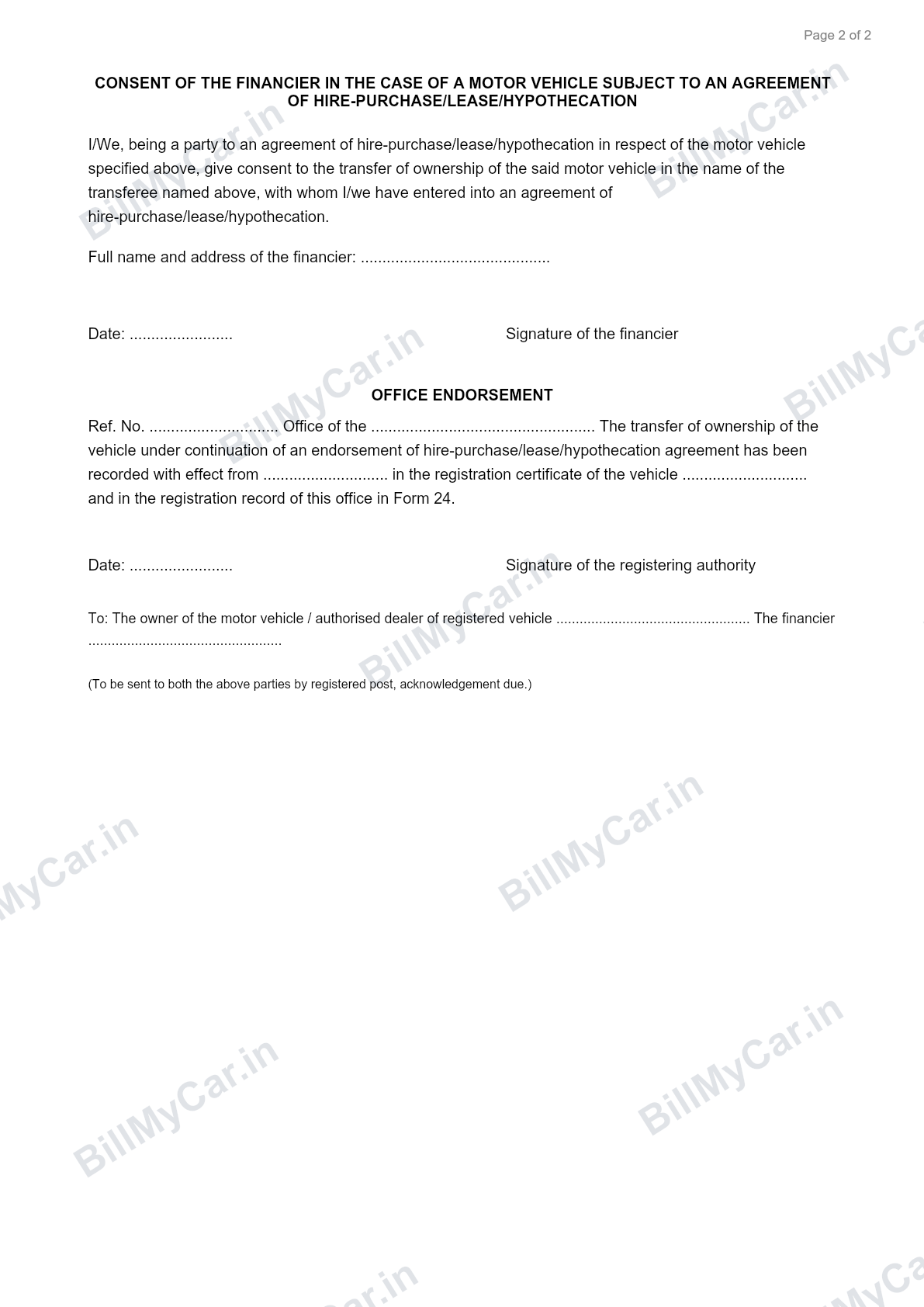
Page 2 of Form 30: the financier consent and office endorsement sections.
Where each person signs, in one table
| Document | Seller (transferor) | Buyer (transferee) | Financier |
|---|---|---|---|
| Form 29 | Right-side signature block | Does not sign | Left side, only if loan exists |
| Form 30 Part I | Signs | Does not sign | Consent section if loan exists |
| Form 30 Part II | Does not sign | Signs | - |
Mistakes that get these forms rejected
- Chassis or engine number differing from the RC by even one character
- Buyer's signature missing from Form 30 Part II
- Sale dates that disagree between Form 29, Form 30, the invoice and the sale letter
- Overwriting or correction fluid on vehicle numbers; start a fresh form instead
- The financier column left signed-but-empty or unsigned-but-filled; it must match reality
- Old address on the seller's RC, which stalls verification (fix with Form 33)
The faster way
Every field above comes from data you already entered on the invoice: buyer name, address, registration, chassis, engine, sale date. Bill My Car generates Form 29 and Form 30 pre-filled from that single entry, along with the invoice, sale letter and delivery note. You print, sign in the right boxes, and file.
Generate Form 29 and 30 pre-filled from your invoice
Bill My Car turns one invoice into GST & non-GST bills, sale letters, Form 29, Form 30 and delivery notes, auto-filled and ready to download. Built for Indian used-car dealers.
Try Bill My Car free →Frequently asked questions
Where do I sign on Form 29 and Form 30?
On Form 29 the seller (registered owner/transferor) signs on the right side as signature or thumb impression of the registered owner, and the financier signs on the left only if the vehicle is under hire-purchase or hypothecation. On Form 30, the seller signs Part I and the buyer (transferee) signs Part II. Sign in blue or black ink exactly as your signature appears on the RC and your ID proof.
Who is the transferor and who is the transferee?
The transferor is the seller, the person whose name is currently on the RC. The transferee is the buyer, the person the vehicle is being transferred to. Part I of Form 30 is for the transferor, Part II is for the transferee.
How many copies of Form 29 and Form 30 are needed?
Form 29 is made in duplicate: one copy for the buyer's RTO and a copy for the seller's RTO if the jurisdictions differ. Form 30 is typically one copy, made in duplicate only when the vehicle is under hire-purchase, lease or hypothecation so the financier gets the endorsed duplicate.
What is Part 2 of Form 30?
Part II of Form 30 is the transferee's (buyer's) declaration: their name, parentage, address, and the statement that they have purchased the vehicle and request the transfer be recorded. The buyer signs it; the seller signs Part I.
Can Form 29 and 30 be filled online?
In most states you can initiate the transfer on Parivahan, which pre-fills the forms from the vehicle database, then print, sign and submit. Bill My Car generates both forms pre-filled from your sale details so you only sign and file.
Where can I see a filled sample of Form 29 and Form 30?
The images on this page show complete filled samples of both forms, field by field. Sign in to Bill My Car to generate your own pre-filled versions from an actual sale entry rather than a generic example.