 Bill My Car
RTO & Ownership Transfer
Form 30 Explained: Application for Transfer of Ownership
For Car and Bike Dealers in India
Start free →When you sell or buy a used car in India, Form 30 is the document that formally asks the RTO to record the change of ownership. If Form 29 is the notice, Form 30 is the application that makes it official.
Here is what Form 30 is, what goes on it, and how to fill it without errors.
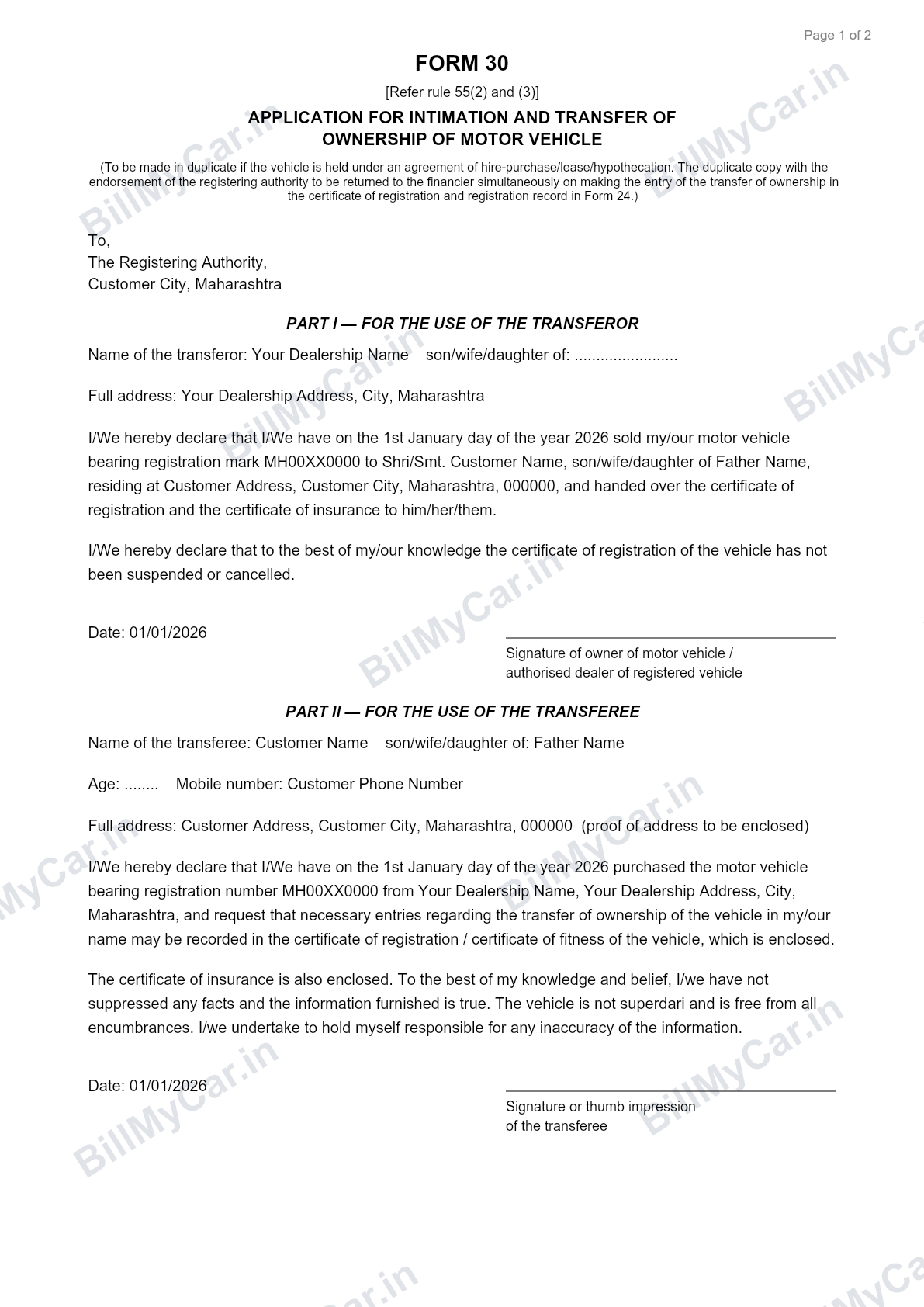
A filled sample of Form 30 generated with Bill My Car. Sign in to BillMyCar.in and generate yours, auto-filled, in seconds.
What is Form 30?
Form 30 is the report and application for transfer of ownership of a motor vehicle, prescribed under the Central Motor Vehicles Rules (Rule 55(2) and (3)). It is filed together with Form 29 as part of the ownership transfer process.
In simple terms: Form 29 says "ownership has changed," and Form 30 says "please update your records to the new owner."
When is it used?
Form 30 is required whenever a registered vehicle changes ownership through:
- Sale of the vehicle
- Transfer by gift
- Transfer on the death of the owner (with extra documents)
- Transfer due to auction or public sale
What information Form 30 needs
- Registration number of the vehicle
- Name and address of the transferor (seller)
- Name and address of the transferee (buyer)
- Engine number and chassis number
- Date of transfer
- Details of any hypothecation (loan) and its termination, if applicable
- Signatures of both buyer and seller
The engine and chassis numbers must match the RC exactly. Capture them once on your invoice and reuse them on every form to avoid mismatches.
Form 30 Part 1 vs Part 2: who is the transferee?
Form 30 has two parts and this is where most confusion sits. Part I is for the transferor, the seller whose name is on the RC. Part II is for the transferee, the buyer the vehicle is moving to. The seller declares the sale in Part I; the buyer declares the purchase and requests the transfer in Part II.
Where to sign Form 30
- Part I: the seller signs, as owner of the motor vehicle (or authorised dealer of a registered vehicle).
- Part II: the buyer signs or gives a thumb impression, above "signature or thumb impression of the transferee".
- If the vehicle is under loan, the financier completes the consent section and the form is made in duplicate.
- Sign in blue or black ink, matching the signature on your RC and ID proof. A missing Part II signature is the most common reason Form 30 bounces at the counter.
For a field-by-field walkthrough of both forms with filled samples, see how to fill Form 29 and Form 30.
How to fill Form 30 step by step
- Enter the registration number and vehicle details.
- Fill the seller's name and address as the transferor.
- Fill the buyer's name and address as the transferee.
- Enter the engine and chassis numbers exactly as on the RC.
- Record the date of transfer.
- If there was a loan, complete the hypothecation termination section with the financier's details.
- Both buyer and seller sign.
Documents filed with Form 30
- Form 29
- Copy of the RC
- Valid insurance and PUC
- Proof of sale (invoice)
- ID and address proof of both parties
- NOC from financier if there was a loan
See the complete checklist in documents required to sell a used car.
Generate Form 30 free
If you just need the form now, use our free Form 30 RTO generator: fill Part I as the transferor and Part II as the transferee, then download a ready-to-sign PDF, with no login. Since Form 30 is always filed together with Form 29, you can generate Form 29 free the same way.
The faster way
Filling Form 30 by hand for every sale means retyping the same details you already entered on the invoice, the sale letter and Form 29. Capture the deal once and generate Form 29 and Form 30 together, already filled and ready to sign.
Auto-fill Form 30 from your invoice
Bill My Car turns one invoice into GST & non-GST bills, sale letters, Form 29, Form 30 and delivery notes, auto-filled and ready to download. Built for Indian used-car dealers.
Try Bill My Car free →Frequently asked questions
Where do I sign on Form 30?
The seller signs Part I as the transferor and the buyer signs Part II as the transferee, in blue or black ink matching the signature on record. If the vehicle is financed, the financier also completes the consent section.
What is Part 2 of Form 30?
Part II is the buyer's (transferee's) declaration: their name, parentage, address and mobile number, with the request that the RTO record the transfer in their name. The buyer must sign it; a missing Part II signature is the most common rejection.
Who signs Form 30?
Form 30 is signed by both the seller (transferor) and the buyer (transferee), because it is the joint application to record the transfer. This is different from Form 29, which only the seller signs.
Is Form 30 needed along with Form 29?
Yes. Form 29 gives notice of the transfer and Form 30 applies to record it. They are submitted together at the RTO.
How many copies of Form 30 are required?
Usually one signed copy is submitted, but requirements vary by RTO, especially for interstate transfers. Confirm locally before filing.