 Bill My Car
RTO & Ownership Transfer
Form 29 RTO Generator (Fill & Download PDF)
For Car and Bike Dealers in India
Start free →Fill and download Form 29 in seconds, free and with no login. Type your details into the fields below and download a ready-to-sign, RTO compliant PDF notice of transfer of ownership. It follows the official CMVR Form 29 format used to transfer a used car's ownership in India, works just as well for a bike, truck or any other registered vehicle, and doubles as a free Form 29 format and template you can reuse.
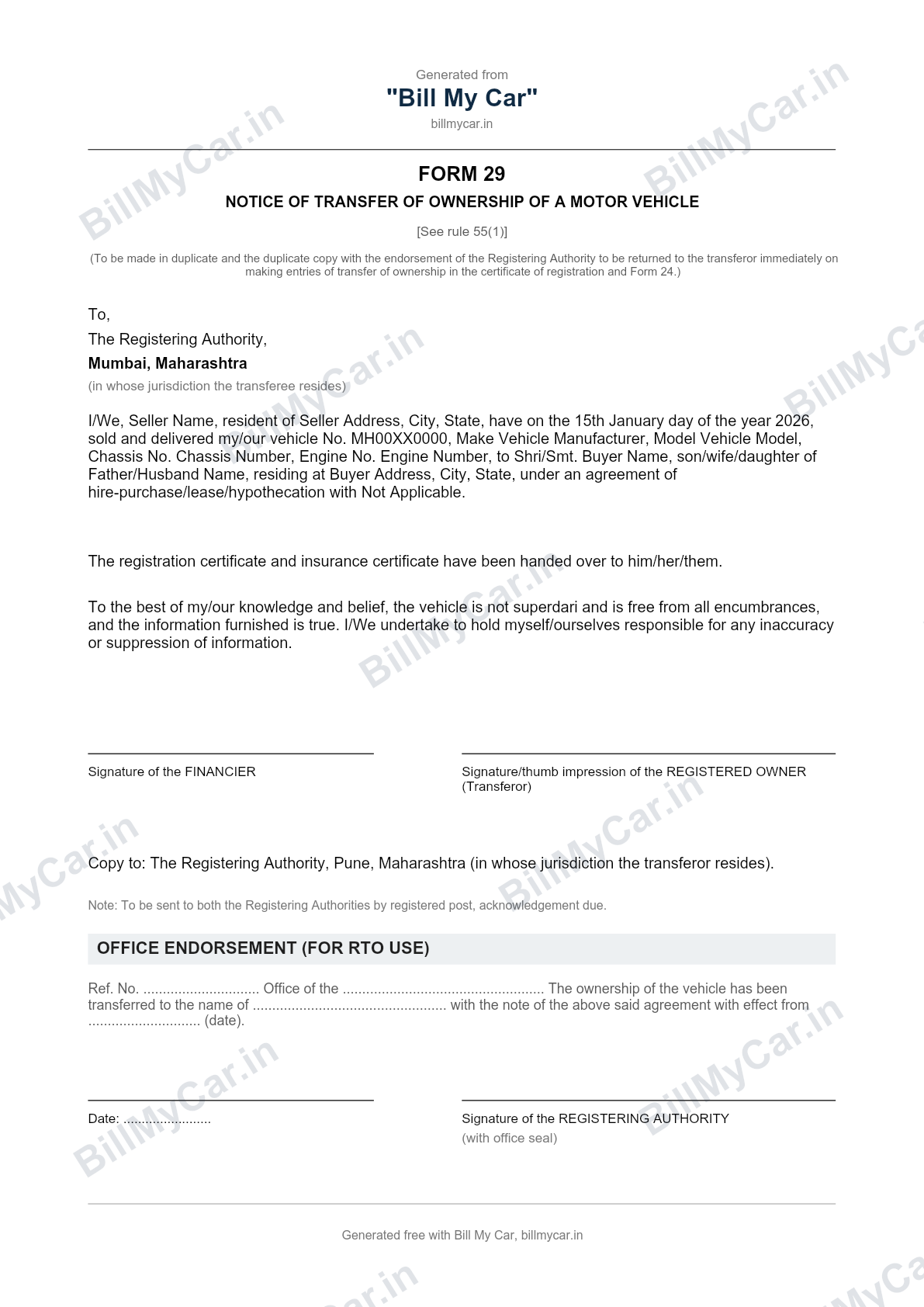
Here is a filled sample of Form 29, showing what your completed notice of transfer of ownership looks like:
Fill and download Form 29 in seconds
- Enter the seller (transferor) details. Name, address, and the financier's name if the car is under a loan.
- Enter the buyer (transferee) details. Name, parentage, and address.
- Add the vehicle details. Registration number, make and model, chassis number, and engine number.
- Add the date of sale, then download the PDF. Tap download to get the ready-to-sign Form 29 straight to your device, then print and sign it.
No account, no upload, no watermark on the document. It is a free, RTO compliant Form 29 you can submit with your other transfer papers.
A free Form 29 format and template
The generator above is a ready-made Form 29 format, so you do not need to find a Word or PDF template or copy the layout by hand. It reproduces the official CMVR rule 55(1) structure: the "notice of transfer" wording, the vehicle and party details, the hire-purchase line, and the signature blocks. Fill it in, download the PDF, and reuse the same format and template for your next sale.
What Form 29 is used for
Form 29 is the seller's (transferor's) notice of transfer of ownership, filed under rule 55(1), Central Motor Vehicles Rules (CMVR), 1989. It states who sold the car, to whom, and on what date, and confirms that the registration certificate and insurance certificate were handed over.
Only the seller signs Form 29. The buyer is named in it as the transferee, but does not sign this particular form. It is one of several papers a seller needs; see the full documents checklist for selling a used car and our step-by-step car ownership transfer guide for how Form 29 fits into the wider RTO process. For a full walkthrough of who fills what and why, see our Form 29 explained guide, or how to fill Form 29 and Form 30 with a filled sample and where each party signs.
Form 29 or Form 30?
Form 29 and Form 30 are filed together, not as alternatives. Form 29 gives notice of the transfer, and Form 30 is the joint application that gets it recorded at the RTO.
| Form 29 | Form 30 | |
|---|---|---|
| Filed under | CMVR rule 55(1) | CMVR rule 55(2) and (3) |
| Signed by | Seller (transferor) only | Both seller and buyer |
| Purpose | Notice that a sale happened | Application to record the transfer |
For the full breakdown, read Form 29 vs Form 30: What's the Difference, or generate Form 30 free below.
Free RTO document generators from Bill My Car
Selling or buying a used vehicle usually needs more than one document. These are also free, no login needed:
Auto-fill Form 29 from your invoice next time
Filling Form 29 by hand works for a one-off car sale, but a dealer doing this every week ends up retyping the same registration number, chassis number and buyer address across five different documents. Bill My Car auto-fills Form 29, Form 30, the delivery note, and your GST or non-GST invoice from a single entry, so nothing gets typed twice. Try Bill My Car free →
Auto-fill Form 29 from your invoice next time
Bill My Car turns one invoice into GST & non-GST bills, sale letters, Form 29, Form 30 and delivery notes, auto-filled and ready to download. Built for Indian used-car dealers.
Try Bill My Car free →Frequently asked questions
Is there a filled sample of Form 29?
Yes. The image above is a filled sample of Form 29, showing how your completed notice of transfer of ownership will look. For a field-by-field walkthrough with a filled example, see our guide on how to fill Form 29 and Form 30.
Who signs Form 29 and where?
Only the seller (transferor) signs Form 29. The buyer is named as the transferee but does not sign it. If the car is under a loan, the financier signs the section for the hire-purchase, lease or hypothecation party.
Can I get Form 29 in Word format?
The generator gives you a ready-to-print PDF rather than an editable Word file. It reproduces the official CMVR Form 29 format you would otherwise recreate in Word, already filled in with your details and ready to sign.
How do I fill and download Form 29 in seconds?
Enter the seller, buyer and vehicle details in the generator above, then tap download. Form 29 is created as a PDF in your browser and saved to your device in seconds, ready to print and sign. No login, no upload.
How do I download Form 29 as a PDF?
Fill the fields in the generator above and tap Download. The Form 29 PDF is generated entirely in your browser and downloaded straight to your device. Nothing is uploaded or saved anywhere.
Is there a free Form 29 format or template?
Yes. The generator above is a free, ready-to-use Form 29 format and template that follows the official CMVR layout, so you do not need a separate Word or PDF template. Just fill it in and download.
Is this Form 29 PDF valid for RTO submission?
Yes. It follows the official, RTO compliant Form 29 format under rule 55(1) of the Central Motor Vehicles Rules (CMVR), 1989: notice of transfer, vehicle and party details, and signature blocks. Fill it, sign it, and submit it with your other transfer documents.
Form 29 kaise bhare?
Upar diye gaye generator mein seller, buyer aur gaadi ki details bharein aur PDF download karein. Koi login ya upload nahi, Form 29 seconds mein ready ho jaata hai, print aur sign ke liye taiyaar.
Do I need to log in or upload anything to use this?
No. Nothing you type is uploaded or saved anywhere. The PDF is generated entirely in your browser and downloaded straight to your device.
Do I need Form 30 as well?
Yes. Form 29 is the seller's notice of transfer and Form 30 is the joint application to record it. RTOs need both together. See our Form 29 vs Form 30 guide, or use the free Form 30 generator below.
What if the vehicle has an active car loan?
Fill in the financier's name in the hire-purchase/lease/hypothecation field. If there is no loan, leave it blank or type Not Applicable.