 Bill My Car
Invoicing and Billing
How to Make a Car Sale Invoice: Step by Step for Dealers and Sellers
For Car and Bike Dealers in India
Start free →A car sale invoice does two things at once: it proves the money side of the deal, and it feeds every other document the sale needs, from the sale letter to Form 30. Here's how to make one properly, whether you're writing it by hand or generating it in seconds.
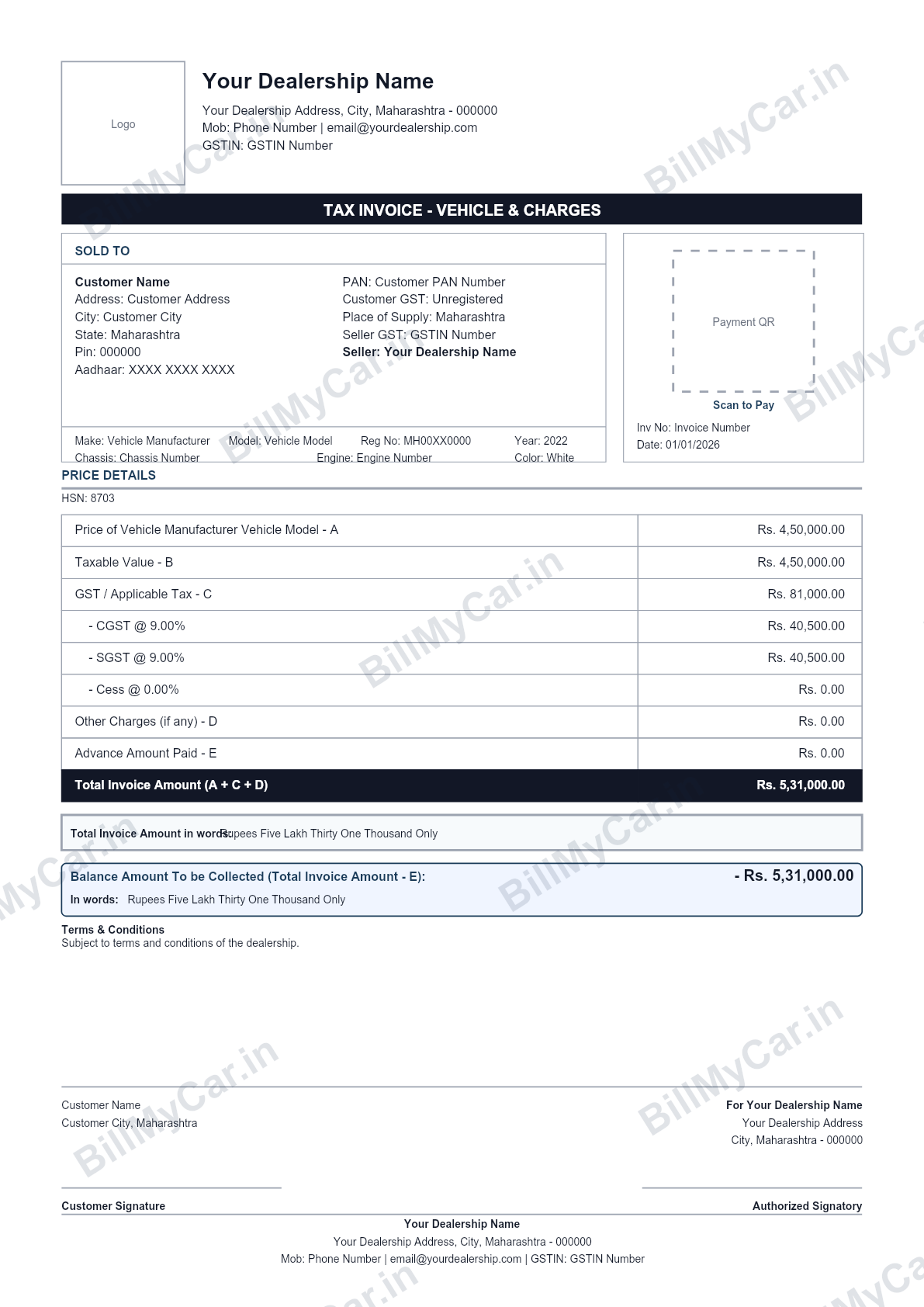
A car sale invoice generated with Bill My Car. Sign in to BillMyCar.in and generate yours, auto-filled, in seconds.
Step 1: GST or non-GST?
- Registered dealer: a GST invoice, with tax on the margin only under Rule 32(5) of the CGST Rules, 2017, HSN 8703, and your GSTIN shown.
- Unregistered dealer or private seller: a non-GST invoice, no tax lines at all.
This is the most expensive invoice mistake to get wrong; the full logic is in GST on used cars.
Step 2: Number it properly
Give the invoice a number from a running series that starts fresh each financial year and never repeats. Something like "INV-2607-001" is fine. Random or reused numbers turn a GST audit into an argument.
Step 3: The identity fields
Seller: dealership name, address, phone, GSTIN or PAN. Buyer: full name, address with PIN, phone, and an ID reference (PAN is required for cash above Rs 2 lakh). Vehicle: registration number, make, model, variant, year, colour, odometer, and the chassis and engine numbers copied character for character from the RC. Those two flow into Form 29 and 30, so a slip here bounces at the RTO later.
Step 4: The money
Sale price in figures and words, any advance taken (with its token receipt), the balance due, and the GST split if it applies. Note the payment mode too; it answers questions years down the line.
Step 5: Sign and hand it over
The dealership's authorised signatory, the buyer's signature to acknowledge it, one copy each. Then make the companions: the sale letter, delivery note and transfer forms, all carrying the same details and dates.
The two-minute version
Every field above is something you type once in Bill My Car. The invoice, sale letter, delivery note and all the RTO forms come out together as PDFs, numbered right, GST-correct, and saved straight to your own Google Drive. Works on mobile or desktop, for used and new car dealerships alike. Formats and templates: used car invoice format, car invoice format India.
Generate a car sale invoice in seconds
Bill My Car turns one invoice into GST & non-GST bills, sale letters, Form 29, Form 30 and delivery notes, auto-filled and ready to download. Built for Indian used-car dealers.
Try Bill My Car free →Frequently asked questions
What must a car sale invoice include?
Seller and buyer names with addresses, the invoice number and date, the vehicle's registration number, make, model, year, chassis number and engine number, the sale price in figures and words, GST details if the seller is registered, payment status, and signatures. Vehicle identity fields are what separate a car invoice from a generic bill.
Is a car sale invoice different from a bill of sale?
They overlap but serve different jobs. The invoice is the money record of the transaction; the bill of sale or sale letter narrates the transfer of the vehicle between the parties. A clean deal has both, plus the RTO transfer forms.
Do I charge GST on a car sale invoice?
Only if you are a GST-registered dealer, and then only on your margin under Rule 32(5) of the CGST Rules, not the full sale price. Private sellers and unregistered dealers issue a non-GST invoice with no tax lines.
Can I make a car sale invoice on my phone?
Yes. Bill My Car works from mobile or desktop: enter the buyer and vehicle once, and the GST or non-GST invoice generates as a print-ready PDF along with the sale letter and RTO forms, saved automatically to your own Google Drive.